The Room Library notes
The library provides an abstraction layer over Database. I think some features are similar to Flask-SQLAlchemy.
Entity
Entity is used to represent the objects stored in Database. Each entity corresponds to a table in the associated Room database, and each instance of an entity represents a row of data in the corresponding table.
using annotations:
1 | |
- Every property that’s stored in the database needs to have public visibility, which is the Kotlin default.
autogenerate unique keys:
>@PrimaryKey(autoGenerate = true) val id: Int,
DAO
DAO(data access object)wrap SQL queries with methods calls. The compiler checks the SQL and generates queries from convenience annotations for common queries.
- The DAO must be an interface or abstract class.
- By default, all queries must be executed on a separate thread.
- Room has Kotlin coroutines support. This allows your queries to be annotated with the
suspendmodifier and then called from a coroutine or from another suspension function.
Implement the DAO
1 | |
Observing database changes
Use a return value of type Flow and Room generates all necessary code to update Flow when the database is updated.
A Flow is an async sequence of values.
RoomDatabase
create a class
1
2
3
4
5
6
7
8
9
10
11
12
13
14
15
16
17
18
19
20
21
22
23
24
25
26
27
28
29// Annotates class to be a Room Database with a table (entity) of the Word class
@Database(entities = arrayOf(Word::class), version = 1, exportSchema = false)
public abstract class WordRoomDatabase : RoomDatabase() {
abstract fun wordDao(): WordDao
companion object {
// Singleton prevents multiple instances of database opening at the
// same time.
@Volatile
private var INSTANCE: WordRoomDatabase? = null
fun getDatabase(context: Context): WordRoomDatabase {
// if the INSTANCE is not null, then return it,
// if it is, then create the database
return INSTANCE ?: synchronized(this) {
val instance = Room.databaseBuilder(
context.applicationContext,
WordRoomDatabase::class.java,
"word_database"
).build()
INSTANCE = instance
// return instance
instance
}
}
}
}
- The database exposes DAOs through an abstract “getter” method for each @Dao.
- The annotation parameters to declare the entities that belong in the database and set the version number.
Repository
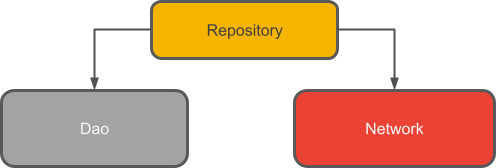
A repository class abstracts access to multiple data sources.
1 | |
ViewModel
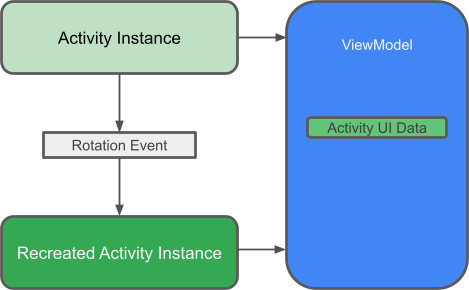
A view model is a communication center between the Repository and the UI and it can also share data between fragments.
ViewModel take care of holding and processing all the data needed for the UI.
LiveData
LiveData is an observable data holder - you can get notified every time the data changes. Unlike Flow, LiveData is lifecycle aware, meaning that it will respect the lifecycle of other components like Activity or Fragment.
Implement ViewModel
1 | |
Concepts
Coroutine
A coroutine is an instance of suspendable computation.(similar to a thread) However, a coroutine is not bound to any particular thread. It may suspend its execution in one thread and resume in another one.
Example:
1 | |
launchis a coroutine builder. It launches a new coroutine concurrently with the rest of the code, which continues to work independently.delayis a special suspending function. Suspending a coroutine does not block the underlying thread, but allows other coroutines to run and use the underlying thread for their code.runBlockingis also a coroutine builder that bridges the non-coroutine world of a regularmain()and the code with coroutines inside ofrunBlocking{}It means the thread run
runBlockingwill get blocked for the duration of the call, until all the coroutines inside the curly brackets finish their execution.
Structured concurrency
An outer scope cannot complete until all its children coroutines complete.
suspending function
Suspending functions can be used inside coroutines just like regular functions, but their additional feature is that they can, in turn, use other suspending functions (like delay in this example) to suspend execution of a coroutine.
1 | |
Scope builder
It is possible to declare your own scope using the coroutineScope builder. It creates a coroutine scope and does not complete until all launched children complete.
runBlocking and coroutineScope builders may look similar because they both wait for their body and all its children to complete.
The main difference:
- the runBlocking method blocks the current thread for waiting.
- coroutineScope just suspends, releasing the underlying thread for other usages.
Because of that difference, runBlocking is a regular function and coroutineScope is a suspending function.
1 | |
Scope builder and concurrency
perform multiple concurrent operation in coroutineScope:
1 | |
an explicit job
1 | |
launch returns a Job object that is a handle to to the launched coroutine and can be used